

Video by Abbat Studio on Pexels

1868 字
9 分钟
ElementUI upload 组件封装
本文同步自 CSDN · 清阿哥,原文发布于 2021-04-15。
开发中遇到了个上传合同的需求,使用的是 elementui 的上传组件,项目中使用比较多,进行了封装,开发完成后总结一下,供大家和自己使用时查看。
上代码!
1. 模板代码
<template> <div class="uploadFile" style="margin-top:15px;"> <!-- 上传组件 --> <el-upload v-loading="loading" multiple ref="upload" :action="actionUrl" :limit="limit" :accept="accepted" :auto-upload="true" :file-list="fileListData" :list-type="listType" :before-upload="handleBeforeUpload" :on-preview="handlePictureCardPreview" :on-exceed="handleExceed" :on-progress="handleUploadProgress" :on-success="handleSuccess" :on-error="handleError" :http-request="handleRequest" :element-loading-text="loadingText" :class="isPreview?'hide_box':''" > <i class="el-icon-plus" slot="default"></i> <div slot="file" slot-scope="{file}"> <!-- 图片显示正常的缩略图 --> <img v-if="allPicType.includes(file.name.split('.')[1])&&imgConfigEmpty" class="el-upload-list__item-thumbnail" :src="file.url" alt="图片预览失败" > <!-- 非图片显示默认缩略图 --> <img v-if="!allPicType.includes(file.name.split('.')[1])&&imgConfigEmpty" class="el-upload-list__item-thumbnail" src="../../assets/images/common/defaultFilePic.png" alt="图片预览失败" > <!-- 预览,上传,删除文件 --> <span class="el-upload-list__item-actions"> <span class="el-upload-list__item-preview" @click="handlePictureCardPreview(file)" > <i class="el-icon-zoom-in"></i> </span> <span class="el-upload-list__item-delete"> <a :href="file.url" download style="color: #fff;"> <i class="el-icon-download"></i> </a> </span> <span v-if="isDisabledDel" class="el-upload-list__item-delete" @click="removeFile(file)" > <i class="el-icon-delete"></i> </span> </span> </div> <!-- 上传提示语 --> <div slot="tip" class="el-upload__tip" v-if="!fileListData.length"> {{ uploadTips }} </div> </el-upload> <!-- 预览时的文件名称样式 --> <template v-if="fileListData.length"> <span v-for="(name,ind) in fileListData" :key="name + ind" class="fileName" :style="{left: `${ind * 155 + 'px' }`}">{{ name.name }}</span> </template> <!-- 上传是的文件名称样式 --> <template v-else> <span v-for="(name,ind) in fileNames" :key="name + ind" class="fileName" :style="{left: `${ind * 155 + 'px' }`}">{{ name }}</span> </template> <!-- 预览图片 --> <el-dialog :visible.sync="dialogVisible" title="查看" append-to-body > <img width="100%" :src="dialogImageUrl" alt="" /> </el-dialog> </div></template>- 参数解释:
multiple:是否支持多选文件actionUrl:上传服务urlhttp-request: 自定义上传(我这里是上传到金山云):class="isPreview?'hide_box':''"预览隐藏上传操作element-loading-text上传加载提示语auto-upload是否在选取文件后立即进行上传
2. js代码
import Vue from 'vue';// import UUID from 'uuid'; 上传是所需要的一个随机生成的id
export default { props: { fileListData: { // 合同文件列表 type: Array, default: () => { return []; } }, isPreview: { // 是否需要隐藏上传操作 type: Boolean, default: false }, limit: { // 限制文件上传个数 type: Number, default: 1 }, noLimitSize: { // 是否限制文件上传大小 type: Boolean, default: true }, fileType: { // 文件类型 type: Array, default: function() { return ['png', 'jpg', 'jpeg']; } }, url: { // 文件上传的地址 type: String, default: '' }, loadingText: { // 加载文案 type: String, default: '加载中...' }, // * 文件的大小个单位 [3,'kb']或[3.'m'] fileSize: { type: Array, default: () => { return []; } }, listType: { // 文件列表的类型 ('text' 'picture' 'picture-car') type: String, default: () => { return 'picture-car'; } }, headers: { // 设置上传的请求头部 type: Object, default: () => { return {}; } }, isDisabledDel: { // 是否展示删除功能 type: Boolean, default: false }, isShowFileName: { // 是否展示文件名称 type: Boolean, default: true } }, data() { return { dialogVisible: false, // 图片预览框 dialogImageUrl: '', // 图片预览路径 uploadTips: '', // 提示文案 accepted: '', // 支持上传的文件类型 allPicType: ['jpg', 'png', 'jpeg'], // * 图片使用弹窗预览 loading: false, // 加载 form: {}, // 上传金山云参数 imgConfig: {}, // 上传金山云参数 actionUrl: '', // 上传服务路径 fileLists: [], // 当前上传的文件 fileNames: [] // 当前上传的文件名称 }; }, computed: { imgConfigEmpty() { return JSON.stringify(this.imgConfig) !== '{}'; } }, mounted() { this.getImgConfig(); this.init(); }, methods: { init() { // 提示内容 if (!this.fileType.length) { if (!this.fileSize.length) { this.uploadTips = `最多支持上传${this.limit}个` + '可以上传jpg/png/jpeg/doc/docx/pdf文件'; } else { this.uploadTips = `最多支持上传${this.limit}个` + '可以上传jpg/png/jpeg/doc/docx/pdf文件,且文件不能大于' + this.fileSize[0] + this.fileSize[1]; } } else { this.uploadTips = `最多支持上传${this.limit}个` + '可以上传'; if (this.fileSize.length === 0) { for (let i = 0; i < this.fileType.length; i++) { if (i === this.fileType.length - 1) { this.uploadTips += this.fileType[i] + '文件'; } else { this.uploadTips += this.fileType[i] + '/'; } } } else { for (let i = 0; i < this.fileType.length; i++) { if (i === this.fileType.length - 1) { this.uploadTips += this.fileType[i] + '文件,且文件不能大于' + this.fileSize[0] + this.fileSize[1]; } else { this.uploadTips += this.fileType[i] + '/'; } } } } // 允许上传的文件类型 if (this.fileType.length) this.accepted = this.fileType.join(','); }, handlePictureCardPreview(file) { // 预览文件 if (!file.url) { this.$message.error('下载失败'); return; } const type = file.name.split('.')[1]; if (['jpg', 'png', 'jpeg'].includes(type)) { this.dialogImageUrl = file.url; this.dialogVisible = true; return; } // 判断文件类型 if (type === 'doc' || type === 'docx') { // 在当前浏览器直接下载 document.location.href = file.url; } else { // 图片在浏览器打开 新的页面展示 window.open(file.url, '预览'); } }, handlerUploadErr() { // 上传失败提示 if (!((Object.keys(this.imgConfig)).length)) { this.$message.error('上传文件失败,请稍后再试'); return false; } }, getImgConfig() { //* 获取金山云权限 Vue.http .get('url') .then(config => { if (config.code === 0) { this.imgConfig = config.data; this.actionUrl = `https://${config.data.host}`; } else { this.$message.error('网络错误,文件将无法上传'); this.loading = false; return false; } }).catch(err => { this.$handleError(err, '网络错误,文件将无法上传'); this.loading = false; }); }, handleRequest(fileObj) { // * 将文件上传至金山云 this.getImgConfig(); // ! 防止金山云凭证过期 this.handlerUploadErr(); // 获取金山云权限失败禁止继续上传 let imgConfig = this.imgConfig; let form = this.form; let formData = new FormData(); // 处理参数 formData.append('key', form.keyPrefix + '/' + form.key); formData.append('KSSAccessKeyId', form.KSSAccessKeyId); formData.append('policy', form.policy); formData.append('signature', form.signature); formData.append('file', form.file); this.loading = true; let hostAddress = imgConfig.host.indexOf('http') > -1 ? imgConfig.host : `https://${imgConfig.host}`; return Vue.axios({ timeout: 0, headers: { 'Content-Type': 'multipart/form-data;' }, onUploadProgress: progressEvent => { const complete = (progressEvent.loaded / progressEvent.total * 100 | 0); fileObj.onProgress({ percent: complete }); } }) .post(hostAddress, formData) .then(() => { let url = '/' + imgConfig.bucket + '/' + form.keyPrefix + '/' + form.key; return this.getImgUrl(url).then(result => { return { uid: form.file.uid, name: form.name, size: form.file.size, url: result.urls[0] || '' }; }); }).catch(err => { this.$handleError(err, '上传文件失败'); this.loading = false; }); }, getImgUrl(url) { // * 获取文件金山云路径 return Vue.http .post('url', { keys: [url] }) .then(resp => Vue.checkResp(resp)) .catch(err => { this.$handleError(err, '上传文件失败'); this.loading = false; }); }, handleBeforeUpload(file) { // 上传之前校验 let imgConfig = this.imgConfig; let lastIdx = file.name.lastIndexOf('.'); let keyName = ''; if (lastIdx > 0) { let fileSuffix = file.name.substring(lastIdx); let reg = /[\u4e00-\u9fa5]/g; if (!reg.test(fileSuffix)) { keyName = fileSuffix; } } this.form = { name: file.name, key: feConfig.IMG_SERVICE + UUID.v4() + keyName, KSSAccessKeyId: imgConfig.ak, policy: imgConfig.policy, signature: imgConfig.signature, keyPrefix: imgConfig.keyPrefix, file }; if (!this.noLimitSize) { this.$message.warning('上传文件大小不能超过 ' + this.fileSize[0] + this.fileSize[1]); return false; } let splitName = file.name.split('.'); let nameLength = splitName.length; if (this.fileType.indexOf(splitName[nameLength - 1]) < 0) { this.$message.error('上传文件格式错误!'); return false; } }, removeFile(file) { // 处理移出文件 this.fileLists.splice(this.fileLists.findIndex(i => i.uid === file.uid), 1); this.fileNames.splice(this.fileNames.findIndex(i => i === file.name), 1); this.$emit('removeFileName', file); },
handleExceed(files, fileList) { // 判断文件上传数量 this.$message.warning( `当前限制最多上传 ${this.limit} 个文件, 本次选择了 ${files.length} 个文件, 共选择了 ${files.length + fileList.length} 个文件` ); }, handleSuccess(response, file, fileList) { // 上传文件成功之后的回调 this.fileNames = []; this.$nextTick(() => { fileList.forEach(i => this.fileNames.push(i.name)); }); clearInterval(this.interval); this.fileLists = fileList; this.$emit('uploadSuccess', response, file, fileList); this.loading = false; this.uploadPercent = file.percentage; const timeOut = setTimeout(() => { this.flag = false; this.uploadPercent = 0; clearTimeout(timeOut); }, 1000); }, handleError() { // 处理上传失败的回调 this.loading = false; this.flag = false; this.uploadPercent = 0; this.$message.error('文件' + this.form.name + '上传失败'); }, handleUploadProgress(event, file, fileList) { // 上传进度 } }};</script>js 代码代码中的上传金山云如果用不到可以去掉这三个函数
getImgConfig(), handleRequest(), getImgUrl()直接把你的后端的 url 加到actionUrl中即可,下载使用的浏览器自带的功能。
3. css 代码
<style scoped>.uploadFile { position: relative;}
/* vue深度选择器 <<< 等同于 /deep/ */.hide_box >>> .el-upload--picture-card { display: none;}
.fileName { position: absolute; top: 150px; left: 0; width: 150px; overflow: hidden; color: #12a1b7; text-align: center; text-overflow: ellipsis; white-space: nowrap;}</style>4. 组件中使用
// 根据自己的实际开发情况添加参数;<fileUpload :is-preview="isPreview" :file-list-data="item.contract||[]" :is-disabled-del="false" :list-type="listType" :loading-text="loadingText" :no-limit-size="true" @removeFileName="removeFileName" @uploadSuccess="uploadSuccess" />5. 效果图
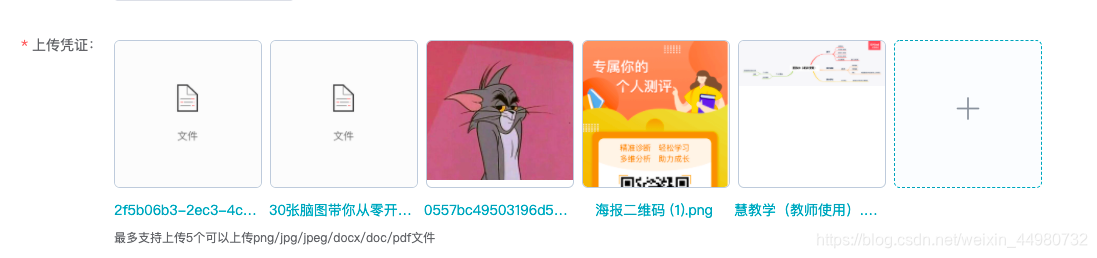
PS:开发中还是遇到挺多问题的,文件名称的显示写的不太好 使用calc 动态调节的样式这个后面可以优化,在网上查找都是重写上传组件,时间紧迫就没有搞了,上传组件的上传进度之前使用的 el-progress 但是有问题,后续再研究添加上上传进度显示,有些过的可以留言交流下。
希望能够帮助到你,有问题可以随时留言交流!
ElementUI upload 组件封装
https://qingge-cabana.vercel.app/posts/elementui-upload-组件封装-115733537/
评论 待开启
评论基于 GitHub Discussions(Giscus)。仓库推送并开启 Discussions 后,在 giscus.app 获取
repoId/categoryId,填入src/config.ts的giscusConfig即可。HHQ-666/qingge-blog